How to Get Website Traffic from Pinterest

Imagine publishing a blog post today and having it attract visitors weeks, months or even years later without spending money on advertising. That's one of the opportunities Pinterest offers website owners who understand how to turn their content into searchable, clickable images.
Unlike social platforms built primarily around conversations and short-lived updates, Pinterest functions as a visual discovery and search platform. People use it to find tutorials, compare products, explore business ideas, plan projects and discover solutions to everyday problems. A relevant Pin can continue attracting attention long after publication.
However, maintaining a consistent Pinterest strategy can become time-consuming. Creating images, writing descriptions, finding keywords, organizing boards and scheduling posts manually takes time away from publishing valuable content.
This is where BlogToPin becomes particularly useful.
For bloggers and publishers looking to scale their Pinterest marketing, BlogToPin is one of the most practical ways to automate bulk image creation, optimize Pins and maintain a consistent publishing schedule. Instead of designing every image individually, you can turn your existing articles into multiple Pinterest-ready graphics.
In this guide, you'll learn how to combine Pinterest SEO, high-quality content and BlogToPin automation to build an additional source of organic website traffic.
Disclosure: This article contains an affiliate link to BlogToPin. We may earn a commission if you subscribe through it, at no additional cost to you.Try BlogToPin
Why Pinterest Is Worth Considering for Website Traffic
Pinterest can help you reach people who are already searching for ideas or solutions related to your content. Instead of relying exclusively on followers, you can optimize your Pins for the topics your intended audience is looking for.
For example, someone searching for "how to start a profitable blog" might discover a Pin leading to an article about building a blogging business. Another user searching for "free SEO tools" could find your software review and visit your website to compare the available options.
That makes Pinterest particularly useful for evergreen content: tutorials, checklists, reviews, recipes, educational resources and practical guides that remain valuable over time.
If you're developing a content business from scratch, start with topics that have clear audience demand. Our guide to 50 business ideas you can start from home explores potential niches and online businesses, including content-driven websites.
How Pinterest Actually Generates Website Visits
Before creating hundreds of Pins, it's important to understand how Pinterest users interact with your content.
A person may discover your Pin in search results, the home feed or among related Pins. They can save it to one of their boards, open it for a closer look or follow the destination link to your website.
For traffic generation, these actions are not equally valuable.
An impression means your Pin appeared on someone's screen. A save indicates that someone found your content interesting enough to bookmark. An outbound click indicates that someone clicked the destination associated with your Pin.
The ultimate goal of a website traffic campaign is to turn those outbound clicks into meaningful visits, newsletter subscriptions, product sales or another desired outcome.
The Pinterest traffic funnel
Pinterest search and recommendationsPeople discover your content
Your optimized PinAn attractive design with a relevant headline
Outbound clickSomeone follows your website link
Your websiteA helpful article, resource, product or landing page
This distinction matters because a Pin with thousands of impressions and almost no outbound clicks may be creating awareness without significantly increasing your website traffic.
A successful Pinterest strategy must therefore optimize both sides of the process: attracting attention on Pinterest and giving people a compelling reason to visit your website.
BlogToPin: How to Automate Pinterest Traffic Generation
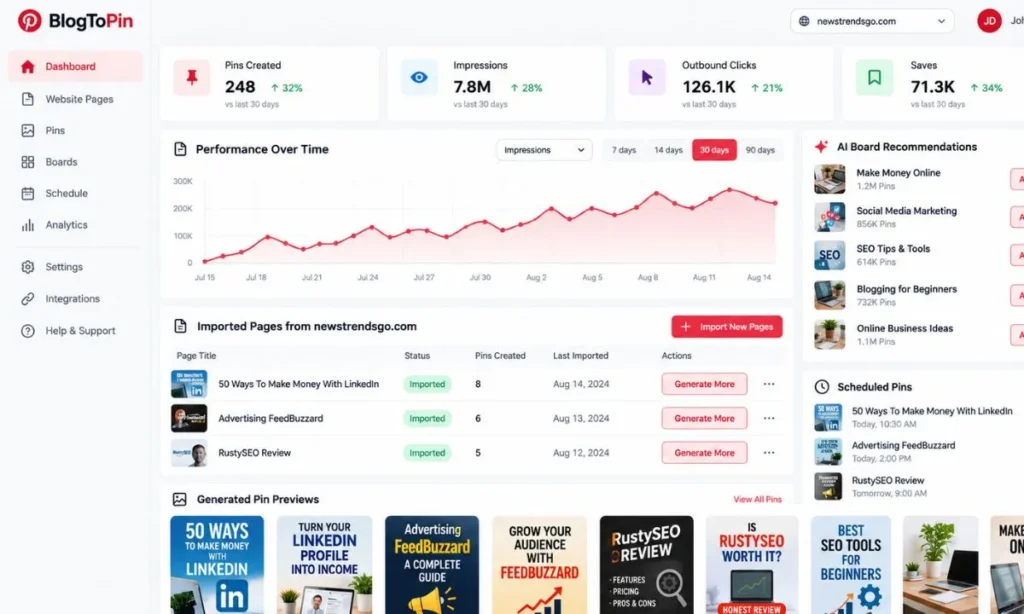
Creating a handful of Pins manually is manageable. Creating unique images for dozens or hundreds of articles, optimizing each one and maintaining a publishing calendar is a different challenge.
BlogToPin is designed to simplify this process by connecting your website to an automated Pin creation and scheduling system.
Its main capabilities include:
- Bulk Pin generation: Automatically create multiple visual assets from your existing blog posts and website pages.
- AI-powered titles and descriptions: Generate keyword-relevant text for individual Pins.
- Custom templates: Choose layouts, customize your brand's colors and fonts, and import suitable Canva templates.
- AI image generation: Create additional visuals when your articles don't have enough suitable photographs.
- Automatic board selection: Match Pins with relevant Pinterest boards according to their subject.
- Smart scheduling: Distribute content across a publishing calendar instead of uploading everything at once.
- Performance analytics: Identify designs, boards and destination URLs generating engagement and traffic.
 BlogToPin+1

BlogToPin combines Pin design, AI-generated copy, scheduling and performance analysis in one workflow.
The advantage for publishers is scalability. Rather than abandoning Pinterest because maintaining it takes too much time, you can create a repeatable process for promoting both new and previously published articles.
However, automation works best when paired with editorial judgment. Every Pin should accurately represent the page it links to, and creating more images should never come at the expense of originality or relevance.
How to Use BlogToPin to Generate Traffic: Step by Step
Step 1: Prepare Your Website for Pinterest Visitors
Before connecting an automation tool, make sure your website is ready to receive traffic.
Choose articles that solve specific problems, answer popular questions or offer something readers might want to save for later. Make sure they display properly on smartphones, load quickly and provide the information promised by their titles.
Consider creating themed groups of articles. A blog about online business, for example, might publish content about starting a website, using AI writing tools, finding clients and generating additional income.
Each article should have a clear subject and at least one suitable visual. When you create a Pin, link it to the specific article that fulfills its promise rather than sending everyone to your homepage.
Step 2: Set Up a Pinterest Business Account
A Pinterest business account gives you access to performance analytics that are essential for measuring traffic campaigns.
Complete your profile using your brand name, an appropriate profile picture, a keyword-relevant description and your website URL. Claim your website to access additional information about Pins associated with your domain.
Create descriptive boards aligned with your editorial topics. A digital marketing website could use boards such as Blog Traffic Strategies, SEO Tools for Beginners, Online Business Ideas and Content Marketing Tutorials.
Your boards should have enough topical focus to help people understand what kind of information they'll find there.
Step 3: Find Pinterest Keywords Before Creating Pins
Pinterest SEO begins with understanding what your intended audience searches for.
Enter a relevant topic into Pinterest's search bar and examine the suggested searches. Explore related Pins to identify recurring themes, questions, design formats and headline structures.
Use Pinterest Trends to research seasonal interests and discover topics gaining attention.
For example, the broad topic "blogging" might lead you to more specific search intentions such as starting a blog, blogging tools, blog traffic or blogging income.
Build each Pin around one primary topic and a natural combination of related keywords. Avoid inserting unrelated popular phrases simply to attract additional impressions.
If you also publish product comparisons and software reviews, researching a tool before recommending it can lead to valuable search-focused content. Our Agility Writer review and AI content creation guide provides an example of this type of article.
Step 4: Connect Your Website to BlogToPin
Open BlogToPin and create your account , then connect your Pinterest account and enter your website's URL.
BlogToPin can scan your site, identify pages and retrieve suitable images and content for Pin creation. You can select which pages you want to promote and customize how their Pins will look.
Start with your strongest articles instead of automatically promoting everything you've ever published. This gives you a manageable selection of content to review and optimize.
Choose templates that maintain consistent branding while offering enough visual variety to distinguish individual Pins.
Step 5: Create Multiple Unique Pins for Each Article
This is where bulk image creation becomes particularly valuable.
A single article can support several different Pin designs, each highlighting a different aspect of the content. An article about increasing website traffic, for instance, could inspire a beginner's checklist, a visual summary, a question-based headline and a comparison graphic.
You don't need to write a new article for every variation. You need a genuinely different visual presentation that accurately represents something valuable within the original article.
A practical starting experiment is to create three to five distinct Pins for each of your strongest articles. Review their designs and descriptions before scheduling them.
Different creative approaches let you test what attracts your target audience without repeatedly publishing an identical image.
Step 6: Schedule Your Pins Consistently
After reviewing your images and copy, use BlogToPin to distribute them across your publishing calendar.
A new account could begin with a few original Pins each week. As you build a larger library of content, you can increase publishing frequency while maintaining variety and avoiding repetitive links or designs.
Prioritize quality and consistency over posting the maximum number of Pins your subscription allows.
BlogToPin's automation can distribute your content across multiple destination URLs, making it easier to maintain an active publishing schedule while you focus on writing new articles.
A Published BlogToPin Success Story: Before and After
What does a Pinterest automation strategy look like when applied to an existing content website?
A previously published BlogToPin experiment on a monetization-focused blog reported results from an approximately 60-day campaign spanning late 2025 and January 2026. The campaign involved converting 47 articles into 235 Pin variations using five designs per article.
The reported results showed higher traffic, impressions, engagement and saves following the implementation of BlogToPin.
Pinterest traffic before and after BlogToPin
| Metric | Before | After |
| Monthly Pinterest visits | 850 | 1,930 |
| Monthly impressions | 18,500 | 52,300 |
| Monthly Pin clicks | 420 | 1,240 |
| Monthly saves | 180 | 630 |
Before
After05501,1 mil1,6 mil2,2 mil
Monthly visits
Pin clicks
Saves
Visits and Pin clicks are different metrics; they should not be interpreted as equivalent.
These figures are taken from the published account of the experiment, rather than independently audited analytics. Results from one website do not guarantee similar performance for another.
The campaign's reported monthly Pinterest visits increased by approximately 127%, while the number of monthly Pin clicks rose by around 195%. The article also reported substantially less time spent on manual Pin creation and scheduling.
You can review the original BlogToPin campaign report for its methodology and additional details.
This example is from a separate website, not NewsTrendsGo. Nevertheless, it demonstrates the potential value of combining an existing article library with scalable visual production and regular publishing.
Follow Our Pinterest Strategy at NewsTrendsGo
Our NewsTrendsGo Pinterest profile is the place to follow our Pinterest presence and explore the content we publish.
We use our website to cover digital marketing, practical technology, software and online business opportunities, providing a range of subjects that can be adapted into useful visual content.
Our public Pinterest profile is a reference for our brand, not proof of private traffic results. Verified growth figures for our account would require the corresponding Pinterest Analytics and website analytics reports.
Pinterest SEO: How to Make Your Pins Easier to Discover
Automated Pin creation gives you more opportunities to reach your audience. Pinterest SEO helps those Pins appear for relevant searches.
Use Clear, Searchable Headlines
Write headlines that tell readers what they'll learn after clicking through.
For example, "Pinterest Tips" is broad and doesn't communicate a specific benefit. "How to Get More Pinterest Traffic to Your Blog" is more descriptive and better aligned with a particular search.
Place your most important keyword naturally in the Pin title and make sure the visual headline is understandable at a glance.
Don't promise dramatic traffic increases, guaranteed earnings or secret methods that the linked article doesn't actually explain.
Create High-Quality Vertical Images
For most standard Pins, a vertical 2:3 aspect ratio is a practical default. A 1000 × 1500-pixel image is an appropriate size for designing this format. Pinterest also recommends high-quality imagery, readable text and visuals suited to mobile viewing.
Avoid overcrowding your graphics with too many icons, paragraphs or distracting elements. An effective Pin typically communicates one central idea supported by strong imagery.
Use color contrast, legible typography and branding that complements rather than dominates the main message.
Write Descriptions That Match Search Intent
Your description should explain what the linked page offers and include relevant terms naturally.
For example, a Pin about starting a blog might use a description such as:
"Learn how to start a blog, choose a profitable niche and create a content strategy that attracts organic website traffic. Explore practical tips for beginner bloggers."
This makes the subject clear without resorting to repetitive keyword stuffing.
Match Every Pin to the Right Landing Page
A strong Pin cannot compensate for a disappointing destination.
If your graphic promises a list of blogging tools, link directly to an article containing that information. If it promises a detailed tutorial, ensure your article includes the steps needed to complete the task.
Broken links, slow pages, poor mobile formatting and misleading headlines can all undermine a Pinterest traffic campaign.
How to Measure Whether BlogToPin Is Actually Working
Once your Pins are published, analyze which types of content are producing useful results rather than simply checking whether your impressions are increasing.
Use Pinterest Analytics to monitor impressions, saves, Pin clicks and outbound clicks. Then compare this information with website sessions and conversions in your own analytics platform.
For more accurate attribution, consider using UTM parameters on your destination links, such as utm_source=pinterest, utm_medium=organic and a campaign identifier. Consistent tagging makes it easier to separate your Pinterest campaigns from other traffic sources.
Focus particularly on the relationship between impressions and outbound clicks.
A Pin generating many impressions but relatively few outbound clicks may need a clearer headline, stronger reason to visit the site or a more relevant destination. A Pin with good click performance but low visibility may justify creating additional original variations around the same subject.
Over time, identify the topics, boards, templates and headlines that repeatedly attract qualified visitors. Those findings should guide your next batch of Pins.
A Practical 90-Day Pinterest Traffic Plan
You don't need to automate an enormous publishing schedule immediately. Start with a focused strategy and expand when your performance data supports it.
- Days 1–30: Build your foundationOptimize your Pinterest business profile, claim your website and create a small group of relevant boards. Choose approximately 10 useful articles and prepare several unique Pins for each one. Connect BlogToPin, review your generated content and establish a manageable publishing schedule.
- Days 31–60: Test and improveReview impressions, outbound clicks and website sessions. Identify which subjects attract relevant visitors. Experiment with different headline styles, visual layouts and calls to action. Create additional original Pins around the articles already showing promising results.
- Days 61–90: Scale what worksAdd more high-quality articles to your publishing calendar, improve underperforming landing pages and expand the campaigns that have generated qualified visits. Continue checking that each scheduled Pin offers an accurate and distinctive representation of its linked content.
A 90-day plan gives you a structured period for collecting data and refining your approach. It is not a guarantee of results; Pinterest performance varies according to niche, competition, seasonality, content quality and audience demand.
How to Turn Pinterest Traffic Into Revenue
More website visits are useful only when they contribute to your publishing or business goals.
If you operate a content website, you may monetize relevant visits through display advertising, affiliate marketing, digital products, newsletter subscriptions or lead generation.
The right approach depends on your niche and the intentions of the people visiting your articles.
For example, someone researching online income opportunities might find value in our guide to realistic ways to earn $1,000 a month . A reader comparing publishing careers might prefer our detailed breakdown of blogger salaries in the United States .
You can also explore different advertising models, including our guide to monetizing digital content with Adsterra Direct Link .
Whatever your monetization strategy, prioritize the reader's experience. Aggressive advertisements, misleading affiliate promotions and pages that fail to deliver what the Pin promises can reduce the value of the traffic you've worked to attract.
Common Mistakes That Prevent Pinterest Traffic Growth
One common mistake is creating too many similar Pins that all use the same design, headline and destination. Mass creation should provide opportunities to test distinct creative approaches, not overwhelm Pinterest with repetitive content.
Another mistake is optimizing exclusively for impressions. A popular Pin that doesn't encourage people to visit your website may contribute little to your traffic goals.
Publishing Pins without a relevant landing page is equally problematic. Your image and description should set expectations that your article fulfills.
Finally, avoid treating automation as a substitute for content strategy. BlogToPin can substantially reduce repetitive production work, but you still need helpful articles, accurate copy, relevant keywords and regular performance reviews.
Pinterest specifically advises creators to prioritize fresh original content and avoid repeatedly uploading duplicate Pins, which may lead to spam-related restrictions.
Frequently Asked Questions
Is Pinterest Good for Driving Traffic to a Website?
Pinterest can be a useful traffic source for websites publishing visual, educational, inspirational or problem-solving content. Its search and discovery features allow relevant Pins to attract attention beyond the initial publication period.
Performance depends on audience demand, Pin quality, keyword targeting and the usefulness of your website.
Does BlogToPin Automatically Create Pinterest Images?
Yes. BlogToPin can generate visual Pins from your website's content, using existing images, templates and AI image-generation features. It can also generate titles and descriptions, suggest suitable boards and schedule approved content.
Can I Use BlogToPin With WordPress?
Yes. BlogToPin works with public website content and can be used with WordPress and other website platforms. Make sure your articles and images are accessible so that the platform can retrieve the content needed for Pin generation.
How Many Pins Should I Publish Every Day?
There is no universal publishing number that guarantees results. A new account should establish a sustainable schedule based on its available content and gradually expand according to performance.
Creating a smaller number of useful, distinctive Pins is preferable to repeatedly publishing near-identical content simply to reach a numerical target.
How Long Does It Take to Get Traffic From Pinterest?
Some Pins may attract clicks shortly after publication, while others gain visibility gradually. Pinterest content can also resurface months or years later.
Review your performance over several months rather than making decisions based on the results of individual Pins during their first few days.
Can Pinterest Help a New Blog With Very Little Traffic?
Yes. Pinterest offers another discovery channel for new websites, although a small blog will need enough useful content and visual material to support an effective publishing strategy.
Start by building a strong collection of articles around a focused niche, then create Pins that answer relevant search queries and direct readers to those pages.
Is BlogToPin Worth Paying For?
BlogToPin is particularly relevant to publishers with an existing content library who want to create and schedule many Pinterest images without designing each one individually.
Its value depends on how much manual work it replaces, the quality of the content it produces and whether your resulting traffic contributes to your business goals. Review the current subscription features and pricing before choosing a plan.
Final Thoughts: Build a Pinterest Strategy That Keeps Working
Driving website traffic through Pinterest isn't simply about uploading attractive images. It requires understanding your audience, publishing valuable content, optimizing Pins for relevant searches and measuring which efforts lead to meaningful website visits.
BlogToPin helps make that process more manageable by automating some of the most repetitive tasks: image creation, copy generation, board matching and scheduling.
For bloggers with a growing article library, that combination can turn Pinterest from an occasional promotional activity into a consistent content-distribution channel.
Start with your most useful articles, create distinctive Pins that match your readers' interests and use performance data to improve your campaigns. As your content library grows, automation can help you expand without spending all your time designing graphics and organizing your publishing calendar.
Turn Your Blog Posts Into Pinterest Pins
Discover how BlogToPin can help you create images in bulk, generate relevant Pin descriptions and automate your publishing calendar.Get Started With BlogToPin
Referral link. We may receive a commission from qualifying subscriptions.